Showing posts with label Technology. Show all posts

Saturday, December 8, 2018

Richmond ES Hour of Code 2018 Success

I had a great week learning and coding with students.  I watched students think, create, collaborate and share. All the tenets of my enrichment programming wrapped into one!

Here is a video hilighting some of the FUN!


**The 'Hour of Code™' is a nationwide initiative by Computer Science Education Week and Code.org to introduce millions of students to one hour of computer science and computer programming.”

Sunday, December 2, 2018

Hour of Code ar RES, December 2018

This week RES students will be participating in Hour of Code during enrichment classes. The week of December 3rd - 7th, 2018 all RES students in grades kindergarten through four will have a hands on introduction to computer programming with Hour of Code activities during their enrichment classes! 

Computer programming helps nurture problem-solving skills, logic and creativity in people of all ages. Kindergarten, first and second graders will use  Scratch Jr. app for iPads, while third and fourth graders will choose from a variety of tutorials on Code.org.


Introducing Hour of Code! Here is a great video explaining some of the benefits of coding:


STUDENTS:  Here are the links for Hour of Code at school this week....some great choices:
Dance Party
https://hourofcode.com/danceparty
Minecraft
https://hourofcode.com/mchoc
Star Wars
https://hourofcode.com/star-wars
Animate your Name
https://hourofcode.com/scratchanim

or choose your own challenge (make sure to note the grade level):
https://hourofcode.com/us/learn

FAMILIES and TEACHERS: Here are links to continue the learning beyond this week at school!  ALL of the included links and recommendations are FREE!
Scratch Jr. iPad app
Scratch Jr. Android app 
More ways to learn from Code.org
Scratch  


Do you have questions about coding?  Do you want to figure out ways to help your kids use computers and tablets to create things versus consume content?  I would be happy to chat with you about this...just reach out to Darcie Rankin at darcie.rankin@cesuvt.org.

“The 'Hour of Code™' is a nationwide initiative by Computer Science Education Week [csedweek.org] and Code.org [code.org] to introduce millions of students to one hour of computer science and computer programming.”


Wednesday, November 28, 2018

Grade 4 Makerspace Advertisements - Mrs. LeFrancois' Class

Students in fourth grade enrichment had an opportunity to work in small groups to create video advertisements for the RES makerspace and makerspace activities.  Students self selected topics and groups and then designed an advertisement using paper storyboarding.  Once groups had a plan in place they used iPads to record videos (and some included green screen and stop motion applications to add another layer of technology).  Next students imported their videos onto their Chromebooks and used WeVideo to edit and create their final videos (including voice overs, music, text additions, video splicing and more!) It was impressive to watch student creativity shine as they walked through this movie making process.

Here are the finished products from Mrs. LeFrancois' Class!


Monday, November 26, 2018

RES Cougar Cub Inventor's Workshop Success

The Thursday before November break RES families came together for the fourth year in a row to celebrate creativity and engineering at the RES Cougar Cub Inventor's Workshop.
What is an Inventor’s Workshop? The workshop was a family-friendly event to MAKE, create, learn, invent, craft, recycle, think, play and be inspired by celebrating arts, crafts, engineering, science and technology.  Students worked with their families to create. Activities were facilitated by engineers and teachers. Families had an opportunity to learn together as they experienced the fun of making / building / constructing / designing and more.


I am so thankful for all of the school and community volunteers that made this evening possible. Volunteers from the Society of Women Engineers ran stations to build jitterbots, create rockets and lead our youngest makers in building marble mazes and floating objects for the wind tunnel. ECHO brought an amazing 34 foot Lego car racing tack and a 10 foot high wind wall that had students laughing and cheering all evening. Radiate Art Space brought a variety of spin art machines and created amazing art with students. CHMS educator, Quinn Keating brought a 3D printer and taught families how to use software that drives this tool. RES educators were on hand to support learning and challenge students as they learned to code in Scratch and build with various materials. Cardboard Tek donated some PinBox 3000s for the evening so students could get excited by the design possibilities they will get to have later in the school year.

Here is a video that captures some of the fun of the evening:

Grade 4 Makerspace Advertisements - Mrs. Berliner's Class

Students in fourth grade enrichment had an opportunity to work in small groups to create video advertisements for the RES makerspace and makerspace activities.  Students self selected topics and groups and then designed an advertisement using paper storyboarding.  Once groups had a plan in place they used iPads to record videos (and some included green screen and stop motion applications to add another layer of technology).  Next students imported their videos onto their Chromebooks and used WeVideo to edit and create their final videos (including voice overs, music, text additions, video splicing and more!) It was impressive to watch student creativity shine as they walked through this movie making process.

Here are the finished products from Mrs. Berliner's Class!


Grade 4 Makerspace Advertisements--Ms. Poncelet's Class

Students in fourth grade enrichment had an opportunity to work in small groups to create video advertisements for the RES makerspace and makerspace activities.  Students self selected topics and groups and then designed an advertisement using paper storyboarding.  Once groups had a plan in place they used iPads to record videos (and some included green screen and stop motion applications to add another layer of technology).  Next students imported their videos onto their Chromebooks and used WeVideo to edit and create their final videos (including voice overs, music, text additions, video splicing and more!) It was impressive to watch student creativity shine as they walked through this movie making process. 

Here are the finished products from Ms. Poncelet's Class!


Wednesday, January 17, 2018

Community Building and 3D Printing

Each year it is so exciting when I am asked to collaborate with other teachers on projects.  I am currently collaborating on a technology and community building project with our technology integration teacher.  It is exciting to collaborate because often I am learning a new skill along side students.  It is also exciting because I believe by modeling collaboration we teach students how to effectively collaborate themselves.


This project began as a discussion about how to best utilize a 3D printer in the elementary school setting.  We knew we wanted students to build something meaningful (not just a trinket)...but we also recognized that there would be a learning curve to utilizing a new tool and we did not want to make something so complex that success would be beyond some students.  Mr. Langevin had the brilliant idea of building something for younger students--perhaps a playdoh tool for use in the kindergarten classroom.  We settled on this idea and began to develop lesson plans that would get us to that end goal.  Our essential goals were to build community in our school and give voice and choice in student learning, while at the same time learning to use an awesome new technology tool.  During these lessons we wanted third graders to:
--Learn to 3D design in Tinkercad (https://www.tinkercad.com/)
--Develop a relationship with a kindergarten student
--Create a design for their new kindergarten friend that aligned with their interests
--See their iterative design process through to completion
--Give their creation as a gift and way to build community
We wanted kindergarteners to:
--Develop a relationship with older students in the school
--Feel welcomed by our school community
--Receive a personalized gift that they could use to play, explore and create at school

To date third graders have created Tinkercad accounts, met with their kindergarten buddies to learn their interests and began to design their playdoh tool.  It has definitely been an exciting month in enrichment! I am not sure if I enjoy seeing students stretch their learning and risk taking through the use of the new Tinkercad tool or watching the relationships in our school community grow---they are both awesome!  We hope to have playdoh tools completed in January.  I have also enjoyed listening to students make connections to the measurement unit that they are studying in math as they determine the correct size for the 3D printing.


Monday, December 4, 2017

Cougar Cub Inventor's Workshop 2017 Success!


On Thursday November 30th the RES community gathered with volunteers from the Society of Women Engineers, ECHO Science Museum, Radiate Art Studio, and CHMS and JES educators to celebrate making, creating, building and learning.  Students and their families had an opportunity to try a range of hands on activities that encouraged them to Make, Create and Share!  The evening was a true celebration of collaborative learning and FUN. 
Here is a video that gives you a small peak into the great events of the evening.


This event could not happen without the help of volunteers inside and outside of our school community.  I am so grateful to be surrounded by people that believe in student hands on learning and are willing to give time to create this type of experience.

Special Thanks for all of their time and talent to:
Chef James-Awesome Farm to School Dinner
Chris Whitaker--ECHO Science Center, STEM Education Coordinator
Rebecca Garavan and Heather Drury--Radiate Art Space Founders and Marble Painting Artists
Basak Simal,Joan Hathaway (and family), Pam Gillis--Society of Women Engineer's Engineers and Rocket and Jitterbot Inspirations
Willie Lee-- BRMS Technology Educator and Vinyl Cutter Extraordinaire
Quinn Keating--CHMS Technology Educator and 3D Printing Master
Dave Bouchard--JES Enrichment Teacher and Little Bits Synthesizer Sound Enthusiast
Beth Redford--RES Library Media Specialist and Coding Guru
Tonya Darby- RES Third Grade Teacher and Lead Learner in all things Electronic
Katie Lefrancois--RES Fourth Grade Teacher and and All Around Student Creativity Supporter


Sunday, December 3, 2017

Hour of Code 2017 at RES This Week!


The week of December 4 -8th, 2017, all RES students in grades kindergarten through four will have a hands on introduction to computer programming with Hour of Code activities during their enrichment classes! 

Computer programming helps nurture problem-solving skills, logic and creativity in people of all ages. Kindergarten, first and second graders will use  Scratch Jr. app for iPads, while third and fourth graders will choose from a variety of tutorials on Code.org.

Introducing Hour of Code! Watch this quick video to see some celebrities learning to code alongside students just like you!


STUDENTS:  Here are the links for Hour of Code at school this week:

Some great choices:
Code Crazy Creatures:  https://hourofcode.com/cacrazy
Animate your name: https://hourofcode.com/scratchanim
Moana: https://hourofcode.com/moana
Monster Maker: https://hourofcode.com/grokmonster
Lego Robot: https://hourofcode.com/bits
Minecraft: https://hourofcode.com/mchoc
Star Wars: https://hourofcode.com/star-wars
Flappy Bird: https://hourofcode.com/flap
Frozen: https://hourofcode.com/frzn

Choose your own Coding (but check the grade level and how hard it is):
https://hourofcode.com/us/learn

FAMILIES and TEACHERS: Here are links to continue the learning beyond this week at school!  ALL of the included links and recommendations are FREE!
Scratch Jr. iPad app
Scratch Jr. Android app 
More ways to learn from Code.org
Scratch  


Need more motivation to keep kids coding? Watch this short film encouraging coding!


Do you have questions about coding?  Do you want to figure out ways to help your kids use computers and tablets to create things versus consume content?  I would be happy to chat with you about this...just reach out to Darcie Rankin at darcie.rankin@cesuvt.org.

Sunday, November 12, 2017

Grade4 Makerspace Movies-Monday Class

Students in fourth grade enrichment have spent time this fall creating movies that share their favorite things about the RES makerspace.  This project has allowed students to dive into the makerspace, utilize movie making software as well as to use the equipment to teach others what is possible!  I love the diversity of makerspace choices and the way in which the students chose to share their info.  All of the created movies are students designed, filmed and edited.

Here is the fourth grade Monday class movies!

Green Screen

CD People "Come to the Makerspace!"

Take Apart Center

Take Apart Safety


Take Apart a Drone
**Coming Soon**
Make a Puppet

Take Apart a Printer


Grade4 Makerspace Movies-Friday Class

Students in fourth grade enrichment have spent time this fall creating movies that share their favorite things about the RES makerspace.  This project has allowed students to dive into the makerspace, utilize movie making software as well as to use the equipment to teach others what is possible!  I love the diversity of makerspace choices and the way in which the students chose to share their info.  All of the created movies are students designed, filmed and edited.

Here is the fourth grade Friday class movies!

Lego Wall Marble Run


Recycled Dudes


Marble Mazes

Green Screen
 

Green Screen Expectations


Yogurt Cup Babies

Coming Soon: Lego Stop Motion Video!

Grade4 Makerspace Movies: Wednesday Class

Students in fourth grade enrichment have spent time this fall creating movies that share their favorite things about the RES makerspace.  This project has allowed students to dive into the makerspace, utilize movie making software as well as to use the equipment to teach others what is possible!  I love the diversity of makerspace choices and the way in which the students chose to share their info.  All of the created movies are students designed, filmed and edited.

Here is the fourth grade Wednesday class movies!

Taking Apart a Computer:


Stop Motion Legos and the Green Screen


The RES Makerspace with Harry Potter


Marble Mazes


Rainsticks in the Makerspace


VCR Take Apart


Homemade Fidget Spinners


CD Player Take Apart

Friday, November 10, 2017

Cougar Cub Inventor's Workshop--Save the Date!

Richmond Elementary School , in conjunction with
the Society of Women Engineers, ECHO Science Museum, Radiate Art Space and  MMUSD Educators is proud to present the third annual:
COUGAR CUB INVENTOR’S WORKSHOP
Thursday November 30th, 2017
5:30 – 7:30pm
RES Gym, Library and Art Room
Cost: 2$ per project (to cover cost of disposable resources, scholarships available)
 
Join Us Before for a Farm to School Dinner !
5-6pm, RES Cafeteria
Chili, Mac-n-Cheese, Salad and a Sweet Treat
Donations to benefit RES Farm to School Programming
What is an Inventor’s Workshop?
This workshop is a family-friendly event to MAKE, create, learn, invent, craft, recycle, think, play and be inspired by celebrating arts, crafts, engineering, science and technology.  Students will work with their families to create!  Activities will be facilitated by engineers and teachers, but tasks will be open ended and creative.  Families will have an opportunity to learn together as they experience the fun of making / building / constructing / designing and more! A variety of activities will be available to challenge students from Grades K – 8.

Activities planned for our workshop include:
Cardboard Challenge:  Create with cardboard! The possibilities are endless!
Making a keyboard with bananas!  MaKey MaKey Boards are electronic devices that convert many regular objects into keys on your computer to control programs like Scratch or videos games.  Objects that are conductive, even slightly, like fruit or people, can be used with the MaKey. 

*New this year*Build and Launch a Rocket!  Using makerspaces materials we will build rockets that reach for the stars as they travel several stories into the night sky.

Creating lighted artwork with throwies!  LED Throwies are LEDs connected to coin batteries to create artwork with light.  They can be added to greeting cards or origami, or used to create nightlights or glowing badges. We will have a station to add LEDs to our rockets
Creating interactive circuits with littleBits!  littleBits are electronic modules that snap together with magnets to make circuits.  Each bit has a specific function (light, sound, sensors, buttons, motors, etc), and modules snap together to make larger circuits. We will have a teacher on hand to use synthesizer Little Bits to create awesome sounds.

Checking out a 3D printer in action!  CHMS and RES students have been using a 3D printer during technology/enrichment classes. Come and watch a 3D printer in action and explore the Tinkercad software we use to make our designs.

Make it Fly!: Create objects to fly in the wind tunnel and fly gliders with BRMS middle schoolers and staff.
Creating abstract art with a digital microscope!  DinoXcope Art is artwork created using a digital microscope to photograph intentional arrangements of materials.  
Programming interactive games with Scratch!  Scratch is a visual programming language.  Use colorful interlocking building blocks of code like legos to build interactive games and programs.

Green Screen! Green screen technology is used to create background scenes for pictures in films and photographs.  Come and create your own awesome photo.
JitterBots!  Back due to popularity, you can create your very own jittery robot!

      SNAP Circuits, Art Creation with Radiate Art Space, ECHO Engineering Challenge, Keva Planks, Robots…and more!!!!
Please contact Darcie Rankin, RES Enrichment Teacher at darcie.rankin@cesuvt.org with questions.
We hope to see you there!

Tuesday, October 3, 2017

An Amazing Learning Extension!

Last year in fourth grade students participated in a combined library and enrichment class in which they were supported in developing research questions based on their own interests, finding the answers to those questions and then developing a project to share what they learned.  The process we used with students is documented on this blog:  https://thinkcreatecollaborate.blogspot.com/

The work that students completed during this capstone process is always amazing and unique because it is really driven by their own interests.

Last year one student decided to work on the question:  How do we remember things?
http://images.all-free-download.com/images/graphiclarge/human_brain_picture_165499.jpg

It turned out that this was a question that his sister and he had been discussing at home and that she had submitted to a podcast show for young learners called Tumble Podcast http://www.sciencepodcastforkids.com/.   He thought that instead of waiting for their response he would find the answer and create his own podcast!  His work was great and at the end of the school year he had completed his podcast:
https://www.youtube.com/watch?v=iZMQUN1hP2o

His podcast was shared with our school learning community at an in person celebration and posted online. Normally this would be the end of the capstone process as students move to the middle school for Grade5!

But in this case, the exciting part is that at the same time the Tumble Podcast had also decided to explore this question. They created their own podcast with the input from expert scientists...BUT they also included our RES students' work as well (his family had shared his work with the podcast producers!)
Here is the completed Tumble Podcast with our RES student featured!
https://art19.com/shows/tumble/episodes/a7e1b749-9440-49b9-b26b-589b78f4b067

When students pursue their interests their learning is always amazing, but this extension beyond the classroom adds to the idea that we build knowledge as a community of learners -- within our school community but also with the support of family members and experts.  I love playing just a small role in a students' learning journey as they navigate their interests and new knowledge.  As a teacher I believe that it is important to support student interests. Each student is the reason I became a teacher, and this connection to the real world is a reminder to me of how we all play a role in the education of our kids. It is inspiring to see how students have the same questions that other adults pursue as careers over a lifetime.  I am so lucky to learn next to such amazing, thoughtful students!

Monday, June 5, 2017

Fourth Grade Capstone Project Celebration! Save the Date!

RES logo.PNG


Fourth Grade Capstone Project Celebration!

All RES fourth graders will be sharing their
Capstone individual research projects
From Enrichment Library class on

June 14, 2017
8:50-9:30 am
RES Library

Families are welcome to join us!
(this is right before the start of Field Day)
We will also be posting all these awesome projects
on our Enrichment Library class blog,

Sincerely,
Darcie Rankin, RES enrichment teacher
Beth Redford, RES library media specialist

Friday, May 12, 2017

Tomatosphere Resources

Second Graders!

Check out this link to find awesome information about our Tomatosphere project and space exploration!
http://tomatosphere.letstalkscience.ca/Resources/Library.aspx

Thursday, March 23, 2017

RES Ambassadors of STEM

A few months ago I blogged about an opportunity that Richmond Elementary School was part of through a grant from the Vermont After School Program and Montshire Science Museum. That Tinkering Grant award allowed us to have some awesome materials for engineering exploration both in school and in an after school class that I hosted.  The relationship that RES established with the Vermont After School program has led to excellent learning for students as well as professional development for myself as the RES enrichment teacher. It also led us to an opportunity to visit the Vermont State House in Montpelier last week and talk to state representatives about all of the great engineering activities, and the amazing makers and scientists that we have at RES.

I was proud to bring six students to Montpelier to participate in a day that included engineering design challenges, a visit to floor of the State House (where our Richmond representative called out our students by name!) and time to engage representatives in making through our RES marble maze display (Students designed elements and created on the spot).

It was great to share about the importance of STEM (Science, Technology, Engineering and Math)---and to see RES students SHINE!  At RES this year we are on a journey to bring making, creating and engineering to all students through the creation of a Makerspace.  It is a journey as we figure out how this work fits into our curriculum as well as our after school programming.  Connecting to the Vermont After School program has been an excellent way to engage in dialog about how we can provide multiple avenues for all students to access these skills and opportunities.


If you have ideas about this topic--I would love to hear from you. This journey is a collaborative one that invites all of us to think about how to provide awesome opportunities for our kids!

Tuesday, March 21, 2017

Today in Second Grade Enrichment

We are going to WONDER together!

We are at the beginning of your second grade inquiry projects and we are going to get started using the website tool Wonderopolis.  We are going to learn about how to wonder and then we are going to use words, pictures and videos to answer our question!

Today's Class Question:
Are Sloths Lazy?

Wonderoplis Link:
http://wonderopolis.org/wonder/are-sloths-lazy

Step 1:
Talk to your partner about the question. What do you already know about sloths?  Do you think they are lazy?

Step 2:
Go to the website link:
http://wonderopolis.org/wonder/are-sloths-lazy

Step 3:
 Listen or read the information about sloths.

Step 4:
Look at the pictures of sloths.

Step 5:
Watch the sloth video.

Step 6:
On a sticky note write something you learned from Wonderopolis today and place it in our Wonder Jar!

Step 7:
Explore other wonders OR comment on blog posts!

Thursday, February 16, 2017

Second Grade Guest Bloggers

I am honored to have second grade classes guest blogging on the Enrichment at RES website for the rest of February and March.  Students have been learning all about the blogging medium during enrichment classes and will be creating posts to share their ideas, interests and information about our class.  We have a very ambitious goal of receiving one hundred comments on our blog posts.  I hope you will look at the student work and leave a comment--having an authentic audience is great!


Sunday, January 29, 2017

Building Coding Connections

In December all students at Richmond Elementary School participated in an Hour Of Code during their enrichment classes.  This was an excellent chance for students to be exposed to the concepts of coding. After several years of Hour of Code at our school, as well as many teachers embracing coding for special projects in their classrooms over the last three years...students have developed great early coding skills.
This year I signed up to participate in the Vermont Robot Rodeo. My teaching goal was for students to have an opportunity to advance their coding skills as they made connections between hardware and software.  I feel that in elementary school the ability to connect coding to the physical manipulation of materials is an awesome way to build true and lasting understanding. I have also seen it increase student engagement as the sharing of results is so transparent (i.e. Robots roll across the floor or say something or react to something!). 

This year I chose to focus the use of robots to build coding connections in our third grade classes(younger classes got exposure to the robots less formally).  We began our investigation by giving every student a chance to explore what robots could do. During this period, we might use apps that were more like a remote control versus coding and kids were encouraged to play.  After this exposure I challenged students to use coding applications to control the robots and to make them 'do something' deliberate and expected.  Students jumped right in to meet this challenge.  They used Blockly and Tickle applications and developed cool project ideas: making a robot draw something, dance to music, greet others, create a light show, interact with another robot, pull a toy on a path, make it through an obstacle course...to name a few!  They wrote many lines of code, tested and iterated to achieve their goal, worked together and had a lot of fun.  Several students pointed out that this work was hard....but not because they wanted  to stop.....but I think they were just proud of themselves! And I was proud of their persistence and drive to learn. 

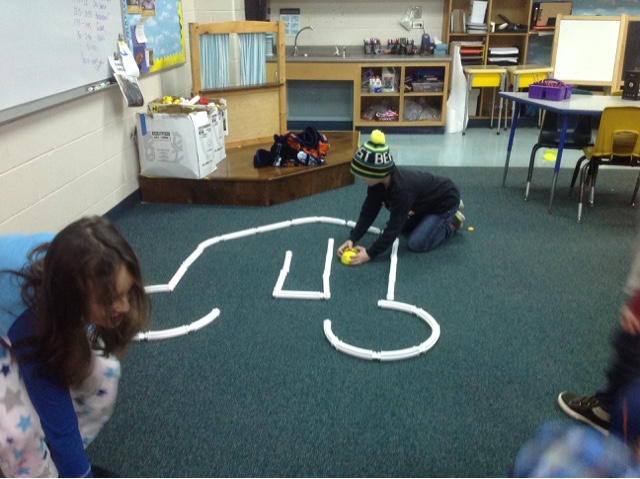
Kindergarten getting early exposure to coding skill through maze building and BeeBot
Third Graders putting their coding skills to the test!

The Vermont Robot Rodeo is an amazing opportunity to expose students to these coding connections and we are grateful to all of the sponsors who provided funds to give our kids the chance to advance their coding skills. We will be sad to send Dash and Dot to the next school--but we are sure that they will learn as much as we did--and we will be watching and checking out their work too.

I look forward to watching as our RES students use all of the skills they developed and applying this same persistence, thinking and collaboration to other learning.
Below is a video that hilights student work with robots, coding examples and student reflections.